Posts

Showing posts with the label Tech Task

weather Underground

Image
   Weather Widget in Your Blog

Tech Task, embeding google maps again

Image

tech task : Twitter Follow

Image
  STEP FOUR. Blog.  After you have followed at least one new Twitter account (and follow as many as you want of course!), you can write up a blog post about the account(s) you are following and why you chose them.  the reason i followed this channel was abou the nostalgia even if it's not suitable for the age back then everyone tried to get it and find a way to buy the game.

tech task week 7

Image
  image Crop and Resize Images=   shorturl.at/oqzIY i tried my best on fotor editor to make size smaller.

Tech Task, week 6

Image
 Tech Tip: Add an HTML Box to Sidebar image link One of the widgets (gadgets) you can add to your sidebar is the HTML/Javascript box. In fact, you can add as many of these boxes as you want. They are very powerful! You can use them to create a box with text and links in your blog sidebar STEP ONE= . Click on the Design link in the upper right-hand corner of your blog and then choose Layout, or go to Blogger.com to access your blog and choose the Layout option.  STEP TWO= . Click on the Add Gadget in the sidebar, choose the HTML/Javascript option, and then you will see this text editing box. Type a message to your readers in the box; the title is optional. You might do a quick "About Me" message, or perhaps you might share some words of wisdom or a personal motto. It's up to you! 

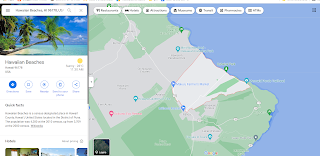
googleMaps

Image
  Tech Tip: Embed Google Map in Blog Post i like the beach and the word Hawaii sounds like kawaii. Hawaiian Beaches

Tech Tips: Fake Twitter and Other Social media

Image
 I chose a Tech Task from the list and followed the instructions. link to fake media generator=  link